


Dual power supply 400-600W, 2-core 4-thread CPU X1, 1 TB hard disk X1, 16 GB memory, QAT hardware SSL Card, supports international encryption security protocols, hardware acceleration, includes 5 virtual sites by default.+ ZTAG concurrent user license package-300 concurrent user license package.
Click here to jump to more pricing!
Overview

A New Perimeter Emerges
Array’s Zero Trust Access Gateway (ZTAG) creates a new security perimeter that gives users access to productivity-enhancing applications while adhering to zero trust principles. Next-gen zero trust goes beyond traditional VPNs to provide identity-based, per-app access, multi-factor authentication, continuous device posture assessment, adaptive access policies, and the ability to make internet-facing applications invisible to unauthorized users.
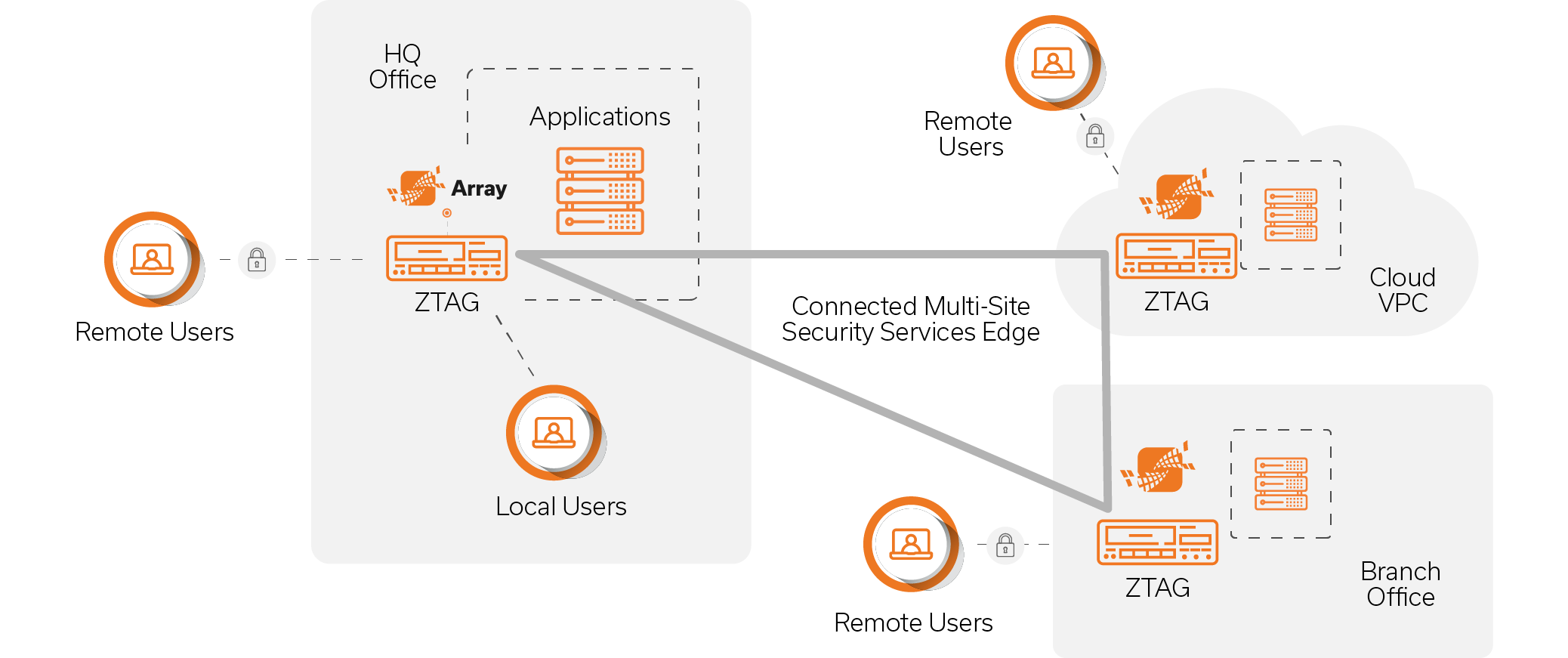
Available on-prem and in the cloud, Array’s ZTAG is ideal for creating connected, multi-site architectures that combine connectivity with advanced cybersecurity to provide defense-in-depth for employee and partner access. Key use cases include secure remote access, zero trust access for all users local and remote, and the creation of a hybrid cloud security services edge that spans geographically disbursed operations.
Secure Access Built on Zero Trust Principles
Array’s ZTAG is built on the "never trust, always verify" principle, providing workers with the resources needed to do their job, while continuously verifying every session to prevent unauthorized access and data breaches.
Features
User Identity & Device Validation
- User Authentication (AAA)
LDAP and RADIUS can be used for authentication and authorization. Supports all LDAP servers that use the LDAPv3 protocol, including OpenLDAP and Active Directory (AD). If multiple authentication servers are used, host polling load balancing further improves authentication performance and ensures user sign-in security. - On-Premises AAA Supports three LocalDB authentication modes:
- Static password: Users only need to enter a static password when signing in
- Dynamic password: Users only need to enter a dynamic password when signing in
- Dual mode: Users are required to enter static and dynamic passwords when signing in
- Multi-Factor Authentication (MFA)
Multi-factor authentication is supported by combining user authentication with an additional form of authentication in the form of either SMS verification code, SAML IdP push notification, dynamic one-time password, digital certificate, or hardware ID hash fingerprint. - Identity Provider (IdP)
Integrate with identity providers, such as Azure AD, Duo, Ping Identity, Okta and other SAML-based MFA services. - SMS Authentication
Short message service (SMS) authentication can be used in conjunction with conventional authentication servers (such as LocalDB, LDAP, and RADIUS) to provide simple and secure multi-factor authentication. - OAuth Authentication
Supports the use of third-party OAuth servers for user authentication, such as Google, Microsoft and other IdPs and quick sign-in providers. - Passwordless Biometrics
Passwordless biometrics, such as fingerprints and faces, are supported on mobile devices. When it is detected that the client is a trusted device and/or is in a trusted environment, passwordless biometrics can be used to quickly sign in a method that is convenient, avoids password security risks, and is difficult to forge or counterfeit. - QR Code Authentication
By displaying a QR code on a PC, mobile devices can quickly scan the QR code to sign in, without having to memorize passwords – reducing security risks and improving the user experience. - Digital Certificates
Supports verification of certificates issued by a trusted Certificate Authority (CA). Three types of client certificate authentication are supported:- Anonymous authentication: only the client certificate is required
- Non-challenge authentication: Client certificate and user account are required on the authentication server
- Challenge authentication: Requires a client certificate, a user account, and a password for the user account
- Hardware ID Fingerprint
Supports hardware ID authentication and full-platform device certificate authentication (connected to the Array MAuth mobile security authentication system) to provide secure trusted device identity authentication services. It supports two modes: user self-registration certificate and administrator registration certificate. - Dynamic Identity Verification
The ZTAG Client can be used to test the client environment, evaluate the security level, and dynamically assign identity authentication methods and step-up authentication for evolving circumstances and risk profiles.
Lightweight Single Sign-On (SSO)
- SAML Authentication
Implemented based on the SAML 2.0 standard. Deploy SAML IDP and SP under the SAML framework. Access multiple different services with a single sign-on, improving both security and the user experience. - OAuth Authentication
Supports OAuth 2.0 protocol for single sign-on to access backend systems and resources. - Basic/NTLM Authentication
Post login, users activate single sign-on using basic authentication or NTML authentication. - Central Authentication Service (CAS)
Supports the CAS protocol for single sign-on and access to backend systems and resources. - Kubernetes Authentication
Allows users to sign in and activate single sign-on through the Kubernetes identity authentication protocol. - Single Point Fill-In
The following single point fill-ins are supported:- Automatically fill user information for PC, web and app resources
- Recognize sign-in page images and automatically fill in sign-in information
- Single Sign-On POST
- Supports SSO POST, form-based single sign-on autofill, and static parameter autofill such as username and password.
- Supports virtual portal SSO, ajax POST submission of sign-in information, and dynamic parameter autofill such as cookie information.
- Supports password encryption, allowing encrypted transmission of original user passwords to real servers using encryption algorithms including SM3, MD5, SHA1, and SHA256.
Authorization & Access Control
- Role-based Authorization
Authenticated users are assigned roles based on parameters including sign-in time, username, group name, source IP address, and AAA authentication method, to provide them with the specific resources needed for their job function. - Granular Access Control
Specify the resources that a user, user group, or role has access to, and provide access control at different granularities for different types of resources:- For web applications, URL-level access control is supported
- For non-web applications, network-level access control is supported for IP, TCP, UDP, and ICMP
- Dynamic Access Control
Authorized resources and access rights can be dynamically adjusted based on the client security status for the duration of a user session. - Zero Trust Policy Engine
When users, devices, or environments trigger preset conditions, corresponding handling policies are instantly applied. The following handling policies are supported:- Elevate authentication level, supporting multi-factor authentication
- Dynamic permissions, flexible handling
- Deny access, block risks
Application Publishing
- Layer-7 Proxy
Layer-7 proxy technology accurately analyzes and rewrites web application source code (HTML and JS) using a next-generation syntax parser to ensure internal applications are not exposed directly to users, and to allow application access without exposing internal networks. - Layer-4 Proxy
Layer-4 proxy technology enables proxy access for all web-enabled applications without installing and enabling virtual NICs, improving the adaptability and ease of use of the solution. Ideal for supporting secure remote desktop and published apps without exposing internal networks. - Layer-3 Connectivity
Layer-3 connectivity supports granular access for specific client-server applications.- Elevate authentication level, supporting multi-factor authentication
- Dynamic permissions, flexible handling
- Deny access, block risks
End-to-End Encryption
- SSL Security Protocols
TLS 1.1, TLS 1.2, TLS 1.3, RSA, ECC - IPSec Security Protocols
IKE, AH, ESP, PFS- thentication Header (AH): Authenticates and verifies the integrity of IP packets to ensure transmission data source is trusted and data is not tampered with; does not encrypt. AH protocol adds a header after the IP header of each packet, and the integrity verification scope of the AH protocol is the entire IP packet.
- Encapsulation Payload Protocol (ESP): In addition to data source authentication and integrity verification of IP packets, it can also encrypt. ESP protocol adds a header to the IP header of each packet and adds an ESP trailer to the end of the packet to encrypt data between the ESP header and the ESP trailer. Data integrity check of the ESP protocol in transmission mode does not contain IP headers.
- IP Sec Parameter Negotiation
To communicate between peers using IPSec, a security association (SA) must be established. Parameters of the SA must be negotiated between peers until the parameters at both ends are the same. Two parameter negotiation modes are supported:- Manual generation
- IKE negotiation generation (IKEv1, IKEv1.1, IKEv2)
- IKE Negotiation Mode
There are two negotiation modes for establishing an IKE SA:- Main Mode: Exchanges 6 messages during IKE negotiation. It uses more exchange resources and time, but encrypts the identity exchange information, making it more secure than Aggressive Mode. Suitable for scenarios where both endpoints have static public IP addresses.
- Aggressive Mode: Exchanges only 3 messages. Uses fewer resources and negotiates faster, making it suitable for scenarios with dynamic public IP addresses or where NAT devices are present. Transmits identity exchange information in plain
- IKE Authentication Method
Supports pre-shared key (PSK) authentication and RSA digital certificate authentication. - IPSec Encapsulation Mode
Supports two encapsulation modes:- Transport Mode: IPSec protocol encrypts and authenticates the payload of an IP packet, while the header portion of the packet remains unchanged.
- Tunnel Mode: All IP packets are encapsulated in a new IP packet, and the new packet is encrypted and authenticated for additional security
- IPSec Encryption Mode
Supports AES, DES, 3DES, and other standard encryption algorithms. - IPSec Authentication Mode
Supports verification algorithms such as MD5, SHA1, SHA256, and SHA384.
WireGuard VPN
- Centralized Authentication & Authorization
Control and data planes are separate. ZTAG functions as the control center responsible for user authentication and authorization. ZTAG Client establishes WireGuard UDP tunnels with WireGuard gateway to forward user traffic.- ZTAG manages the WireGuard gateway and helps exchange the necessary information between ZTAG Client and the WireGuard gateway for establishi
- Performance Optimization
WireGuard protocol is used to create a UDP encrypted tunnel, which can effectively improve the access speed of a single user and reduce the latency.- In the intranet gigabit wired network environment, upload and download speeds are improved by more than 60% compared with traditional connection methods
- In a mobile 4G hotspot network, upload speed is improved by more than 120%, and the download speed is improved by more than 70%
- Flexible Deployment
- Available as software, deployment is flexible and convenient for scalable expansion
- After the ZTAG Client establishes a WireGuard connection, it can select another WireGuard gateway from the connectable list to establish the tunnel
Reporting & Monitoring
- Log Servers
Stores all historical system logs in case administrators need to troubleshoot the system; supports sending and storing Syslog messages at a specified level on a remote log server, and can support 6 different log servers at the same time. - Standardized Log Formats
Log format complies with Syslog standards and supports multiple log types. Each type of log entry conforms to WELF standards. - Detailed Logs
All access and operational actions can be monitored and audited:- User Access Logs: Records authentication and sessions, Web access, TCP applications, portal sign-in and sign-out, as well as HTTP requests and responses
- Management Logs: Records operational information for ZTAG configuration via CLI or WebUI
- SNMP
Supports SNMP v1, v2, and v3, and its own SNMP MIB is maintained and provided for administrators to monitor and manage devices. - Email Alerts
Configure email alerts to send alarm information to an email address by setting trigger conditions.
Additional Feature Functions
- Single Packet Authorization (SPA)
Connections established only for clients carrying gateway information and valid single packet key. Hides networks and applications from the internet and prevents brute force authentication attempts and DDoS attacks. - Portal Customization
- Customize sign-in page, sign-out page, portal resource page, challenge page, password change page and error pages
- Full-page customization, including changing page style, images and text, to meet the needs of different users and groups
- Internal & External Network Detection
Automatically detects end-user network location and provides different policies based on location. - Intranet Traffic Bypass
When a user is authenticated in an intranet location, access traffic can be directly connect to resources without going through the gateway proxy, reducing network load on the ZTAG platform. - Password Management
To meet both ease-of-use and security requirements, ZTAG supports self-service password change functions:- a user forgets their password when signing in, he or she can change the password through a custom authentication method
- After signing in, the user can change the password independently
- After the user signs in, he or she can be forced to change the sign-in password
- Lock when free
Product Function
Single Packet Authorization (SPA)
Single packet authorization makes Array's zero trust access gateway invisible to unauthorized users. SPA elimainates the "connect first, then authorize" approach used by VPNs. Ports do not need to be exposed to listen for connection requests, and as a result are less vulnerable to network scans, brute force hacking and DDoS attacks. Only managed device, loaded with Array's ZTAG client, are aware of the gateway and have the means to generate the single packet required to establish a connection.
User Identity & Device Validation
Array's ZTAG supports a borad range of user authentication methods, including popular AAA solutions, cloud-native IdP, multi-factor authentication (MFA), dynamic passwords, collaborative signatures, biometric recognition, QR code login, SMS authentication, digital certificates, and device hardware ID.
In addition, ZTAG performs continuous assessment of end-user devices to apply step-up authentication as needed based on changes in the end-point environment, network threat detection and user behavior analysis.
Continuous Adaptive Access Control
ZTAG’s built-in policy engine continuously recalculates user access rights based on changing risk factors such as device health, user behavior, geolocation, and time of access. If a device fails a compliance check mid-session or a suspicious behavior is detected, ZTAG can automatically downgrade permissions, trigger re-authentication, or terminate access. Continuous adaptive access control ensures that resources are only accessible under compliant and trusted conditions, aligning with zero trust principles.
Advanced Client Security
In addition to providing encrypted connectivity, the ZTAG client strengthens security for managed end-user devices. It enforces strict device posture assessment, restricts clipboard access, blocks screen sharing, and disables file uploads and downloads in sensitive sessions. These controls prevent data leakage and unauthorized actions on end point devices, even during legitimate sessions. The ZTAG client also supports tamper-proof configurations and session self-cleaning, such as cache wipe and forced logout, to protect enterprise data across all user environments.
Granular Authentication Parameters
The ZTAG client may be configured to require OS, patch levels, antivirus status, port usage, and other parameters such as location, IP reputation, and connection type as prerequisites for authentication. Additional authentication controls include the ability to set account expiration dates, lock-out idle timers, password requirements (strength, reset and reuse), and failed login limits, as well as approval chains and device binding for sensitive apps and resources.

Least Privilege Application Publishing
Supports publishing enterprise services using Layer-7, Layer-4, and Layer-3 technologies based on the specific business needs of different users – shrinking the attack surface by providing access to authorized users and groups on a per application basis.
- Layer-7 proxy supports all browser-based applications, enabling connectivity and application access without the need to bring users onto the private network. Ideal for modern web apps, unmanaged personal devices, and extranet partner access.
- Layer-4 connectivity supports high- performance remote desktop, published apps, and client-server applications; proxy technology enables access without exposing the private network.
- Layer-3 network-level access ensures secure access to all applications based on the TCP, UDP, and ICMP protocols. Ensures that separate VPN solutions are not needed to support full range of enterprise applications. Restrict user and group access to specific applications using access control policies.
End-to-End Encryption
ZTAG supports end-to-end encryption for endpoint-to-gateway and gateway-to-gateway connections. ZTAG uses the TLS 1.3 protocol and ECC and RSA ciphers for endpoint-to-gateway connections that ensure the confidentiality and integrity of data during transmission. Where performance is at a premium, WireGuard may be used to accelerate performance – for example on internal gigabit wired environments. Gateway-to-gate-way encryption uses IPSec and industry-standard AES/SHA encryption and authentication.
Simple Single Sign-On (SSO)
Array’s zero trust access gateway supports streamlined authentication, allowing users to log in once and seamlessly access all authorized systems and applications without needing to reauthenticate. SSO helps enterprises eliminate identity silos across business systems and improves login efficiency. ZTAG also supports lifecycle management for all user accounts to significantly reduce management costs while improving security and the overall user experience.
Reporting & Monitoring
ZTAG records all user authentication and application access activities, and allows logs to be queried by date, user, application, IP address, and other parameters. In addition, ZTAG supports exporting of logs in standard formats to logging servers, where audit monitoring platforms can use the data to model user behavior patterns and perform monitoring and retrospective analysis of user access activities. At the system level, ZTAG provides a real-time graphical interface that monitors CPU utilization, memory resources, and traffic across network interfaces to ensure the platform is running in its powerband.
Performance, Scale & Reliability
ZTAG leverages Array’s patented SpeedCore™ single-pass architecture to achieve industryleading throughput and concurrent user performance metrics. More users can use more apps more often without incurring productivitydisrupting latency. For high availability, two or more ZTAG systems may be set up to continuously synchronize their state and configuration information. In the event of a system failure, available systems will automatically take over application services from the failed node, eliminating single points of failure and ensuring an always-on user experience.
Key Use Cases
Secure Remote Access
Employees working remote cannot directly access internal resources. For these workers, ZTAG can proxy and publish internal services. ZTAG helps enterprises deploy simple and secure remote access at scale that allows workers to confidently access the applications they need to do their jobs.
Zero Trust Secure Access
True zero trust means holding all users to the same standards, whether local or remote. Front-ending business-critical apps with Array’s ZTAG, enterprises can enforce strong user authentication, device validation, granular access control, and app-level connectivity for all users anytime, anywhere.
Security Services Edge
For enterprises with multiple sites or a hybrid cloud architecture, secure connections between sites are essential to seamless access. ZTAG can be deployed on-prem and in the cloud to establish a security services edge on which additional security services can be layered to protect sensitive data.
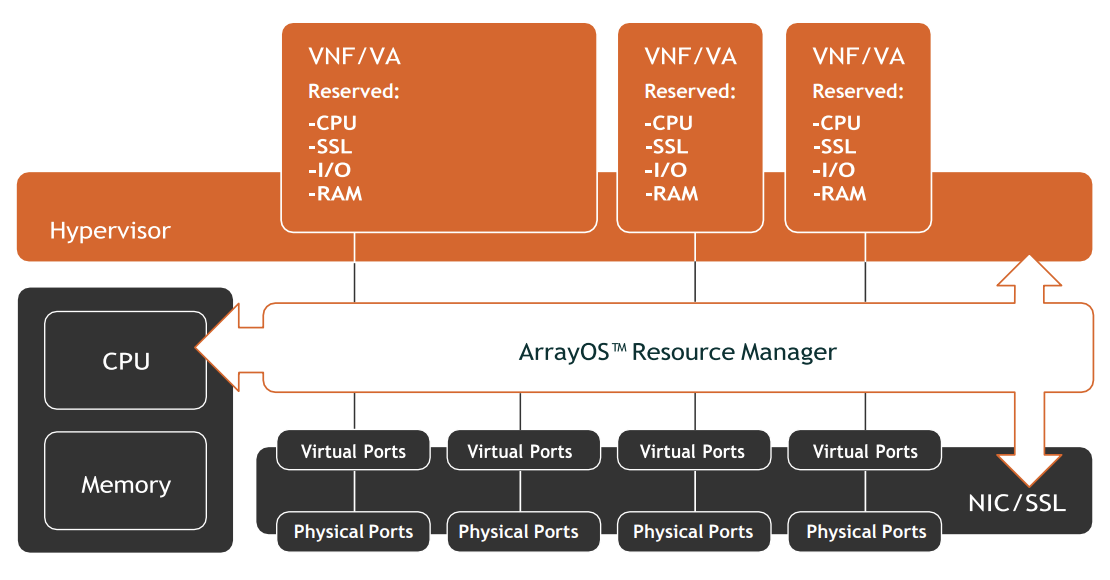
AVX Series Network Functions Platform Architecture
Specifications
| ZTAG 500 | ZTAG 1150 | ZTAG 1200 | ZTAG 1600 | |
|---|---|---|---|---|
| Max. Concurrent Users | 3K | 12K | 25K | 128K |
| Max. Virtual Portals | 10 | 50 | 256 | 256 |
| Encryption Throughput (RSA) | 2.5 Gbps | 5 Gbps | 10 Gbps | 20 Gbps |
| New Connections per Second (RSA) | 1.4K | 10K | 19K | 139K |
| 2048-bit SSL Processing | Yes | Yes | Yes | Yes |
| Compression | Yes | Yes | Yes | Yes |
| Interfaces | ||||
| 1GigE Copper | 4 | 4 | 4 | 4 |
| Combo Port | 4 | |||
| 1GigE Fiber | 2 | |||
| 10GigE Fiber | 2 | 4 | ||
| Clustering | Active/Active-Active/Standby | |||
| Form Factor | 1U Single Power | 1U Dual Power | ||
| Typical Power Consumption | 45W | 85W | 110W | 150W |
| Input Voltage | Single Power: AC 100-240V, 50/60Hz,1.0A max | Dual Power: AC 100-240V, 50/60Hz, 6.5A max | ||
| Dimensions | Single Power: 440mm“W”, 450mm “D”, 44.5mm“H | Dual Power: 435mm "W", 536.4mm "D", 44.5mm "H" | ||
| Weight | Single Power: 6.20kg | Single Power: 9.88kg | Dual Power: 10.02kg | |
| Support & Warranty | ||||
| Support | Gold, Silver and Bronze Level Support Plans | |||
| Warranty | 1-Year Hardware, 90-Days Software | |||
| Regulatory Compliance | CIES-003, EN 55024, CISPR 22, AS/NZS 3548, FCC, 47FR part 15 Class A, VCCI-A. | |||
| Safety | CSA, C/US, CE, IEC 60950-1, UL/CSA 60950-1, EN 60950-1 | |||
Standard
Optional
Documentation
Download the Array Networks AVX Series Network Functions Platform Datasheet (PDF).
Pricing Notes:
- Pricing and product availability subject to change without notice.
Dual power supply 400-600W, 2-core 4-thread CPU X1, 1 TB hard disk X1, 16 GB memory, QAT hardware SSL Card, supports international encryption security protocols, hardware acceleration, includes 5 virtual sites by default.+ ZTAG concurrent user license package-300 concurrent user license package.
Our Price: $825.00
Our Price: $3,900.00
Our Price: $6,300.00
Our Price: $4,729.67
Our Price: $6,306.23